
Laser marking suite for fiber galvo systems
FocuZ
Built from the ground up as 3D-first fiber laser marking software. Import solids and meshes, slice 3D objects for perfect engraving precision — and control additional axes of movement while marking (hardware coming soon). 2D marking covers everything you’d expect — and adds fill variation, a broad set of fill patterns, advanced sublayer control, and more.
Free 30-day trial · full functionality · no account needed · Windows 10+ (64-bit)
Purchasing info
License — Regular price · Use code for off your purchase ·
Pay once. Covers up to 3 computers and includes a year of updates. Buy it from the License tab in the app, or directly here.
License Update —
Adds another year of updates whenever you want it. Your license never expires either way. Available from the License tab in the app.

Runs on actions
FocuZ builds every job as a sequence of actions — mark, position or calibrate. Steps can repeat or jump back — it’s more than a straight list. And each action is purpose-built with real depth: one action can do what would otherwise take a stack of layers, and the setup stays concise — one look tells you what the job will do. As FocuZ grows, so will the set of available actions.
Features
Fill variation
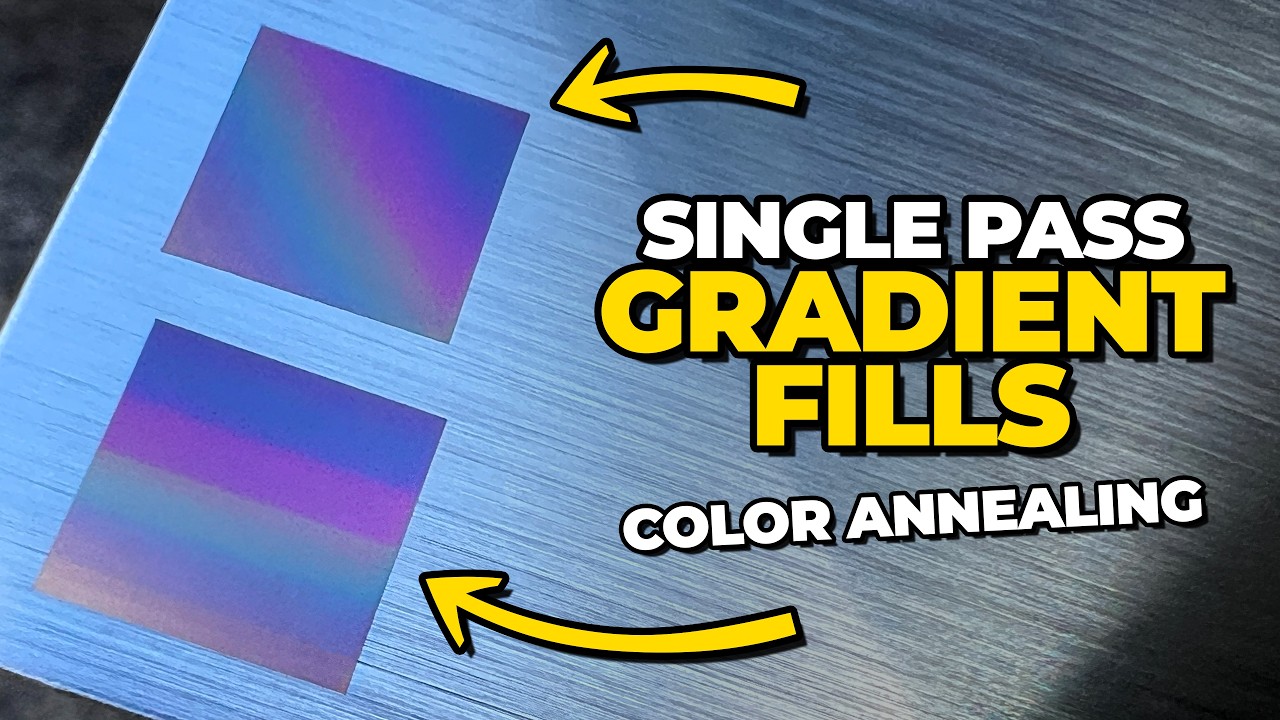
Vary marking parameters along the fill itself — ramps and per-segment changes that turn a flat fill into a gradient of color, a variable texture, or another creative result entirely. Pick the scope — along each line, per chord, per quadrant — and FocuZ carries the variation smoothly across every shape in the layer.
Calibration built in
Multi-layer and sublayer test grids, plus easy calibration of the red light pointer and work coordinate offsets — all built-in actions. Each lens keeps its own corrections, field size, offsets, and focus height — up to eight profiles, nothing shared. Precision focus-height finding works with both manual and FocuZ-compatible positional Z-axis systems.
Field-tested: across 15 production laser systems at Ti2 Design, replacing vendor-supplied height sticks with the FocuZ method of finding optimum Z height on manual lift platforms cut run times by up to 30% and created better laser-to-laser marking consistency — with mark quality maintained.
3D first. 2D always.
Built as 3D software from day one: bring in STL, OBJ, STEP, and 3MF solids and meshes alongside the full range of 2D artwork — in one workspace.
True 2.5D slicing
Slice 3D models directly into marking passes for relief engraving. No depth maps, no grayscale estimation — the slices you preview are exactly what marks.
2D that just imports
SVG, DXF, AI, EPS, and PDF come in at their true size — units, artboards, transforms, and hidden layers handled the way the file intended. Keep a file’s layers separate or flatten them to one on import.
A library that compares
The built-in Library puts templates, saved files, and your current job side by side — flagging every setting that differs and pushing exactly the ones you choose. Nothing changes that you didn't ask for.
Templates that do the work
Build templates that only need artwork dropped in — or reuse any saved .focuz project as a template, marking settings included. Minimal library upkeep.
Rotary done right
Seam-aware splitting keeps joints out of your artwork, and arc compensation keeps geometry true across each split — with the whole job previewed wrapped around the part before you run.
Motion & I/O
Expands what an EZCad2-based BJJCZ fiber board can do: FocuZ-compatible 3-axis motion control — positional Z, X, and Y — plus external 5 V / 24 V relay control. Plug and play, alongside the board you already own — modern 3D capability without the cost of a new laser system, or the price and downtime of a controller-generation upgrade.
Compatibility
Supported controllers & lasers
BJJCZ / Beijing JCZ fiber galvo controllers — the board family commonly sold as an "EZCad2" or "EZCad2 / LightBurn-compatible" controller.
Tested on the Lite boards LMCV4-FIBER-M and FBLI-B-LV4. The less common Standard board (LMCV4-FIBER, without the -M; some sellers list it as "FBLMCB-V4") is untested but should work — with a motorized Z through a FocuZ-compatible Z controller, not the board's own Z axis. Fiber laser sources only.
System requirements
Operating system — Windows 10 or later (64-bit)
Memory — 8+ GB RAM recommended
Graphics — OpenGL 3.3-capable graphics, dedicated or integrated
NVIDIA GeForce 8+, AMD Radeon HD 2000+, Intel HD 4000+
Disk — ~500 MB free space
Connection — One free USB 2.0 or newer port (two with a compatible motion control card)
File formats
3D solids & meshes — STL · OBJ · STEP/STP · 3MF
2D artwork — SVG · DXF · AI · EPS · PDF
Projects & templates — .focuz
License & trial
The trial runs 30 days with full functionality — no account, no card. A license is pay once: it never expires, covers up to 3 computers, and includes a year of updates — purchased right from the License tab in the app. Renew only if you want another year of new releases; every version from your update period is yours forever.
Questions
Can FocuZ engrave STL or STEP files?
Yes. Import an STL, OBJ, STEP/STP or 3MF model and FocuZ slices it directly into marking passes for relief engraving — no depth map or grayscale image in between, so the slices you preview are exactly what marks. Guides: Engraving STL and STEP models · Slicing vs depth maps.
Can I switch from EZCad2 or LightBurn without a new controller?
Yes — FocuZ runs the board you already have. From LightBurn there's nothing to install: both use the same WinUSB driver, so just close LightBurn first. From EZCad2, switch the USB driver to WinUSB once with the free Zadig tool; on first run FocuZ walks you through importing your EZCad2 markcfg7 and lens correction. Guide: Switching from EZCad2 or LightBurn.
How does FocuZ handle seams on a rotary?
Every seam is planned before anything marks, down to the motor step. FocuZ divides the part into even splits that close exactly on a seam after a full turn — no leftover sliver — and places each split from the artwork itself rather than adding up moves, so every seam lands within a single motor step of where it was planned and nothing drifts around the part. Seam-aware splitting moves seams into gaps in the artwork where it can, arc compensation keeps geometry true across each split, and an optional backlash-safe start keeps gear play out of the first seam. Guide: Rotary seams: causes and fixes.
How do the trial and license work?
The trial runs 30 days with full functionality — no account, no card. A license is pay once: it never expires, covers up to 3 computers and includes a year of updates, and you buy it from the License tab in the app or directly here. FocuZ runs on Windows 10 or later (64-bit).